PDF files often contain pages you don’t need — blank pages from scanning, outdated information, mistakes, or extra content that should not be shared. These unnecessary pages can make documents confusing, unprofessional, and harder to manage.
If you need to delete PDF pages quickly without installing software or paying for expensive editors, online tools are the simplest solution. With the Delete PDF Pages tool from NasajTools, you can remove unwanted pages from a PDF securely, for free, and directly in your browser.
Why Delete Pages From a PDF?
Removing pages from a PDF is one of the most common document-editing tasks. It helps keep files clean, accurate, and easy to share.
Main benefits of deleting PDF pages include:
- Removing blank or duplicate pages
- Deleting incorrect or outdated information
- Cleaning scanned PDF documents
- Reducing file size
- Preparing PDFs for sharing or printing
When you delete pages from a PDF file, the document becomes clearer and more professional.
When Do You Need to Delete PDF Pages?
People usually search for a delete PDF pages online tool in real-world situations such as:
- Removing internal notes before sending a file to clients
- Cleaning up scanned documents with blank pages
- Deleting draft pages from reports or assignments
- Preparing contracts or legal documents
- Reducing PDF size before uploading or emailing
- Printing only the pages you actually need
Instead of recreating the entire document, deleting specific pages is the fastest and safest solution.
How to Delete PDF Pages Online
You don’t need any technical skills to remove pages from a PDF.
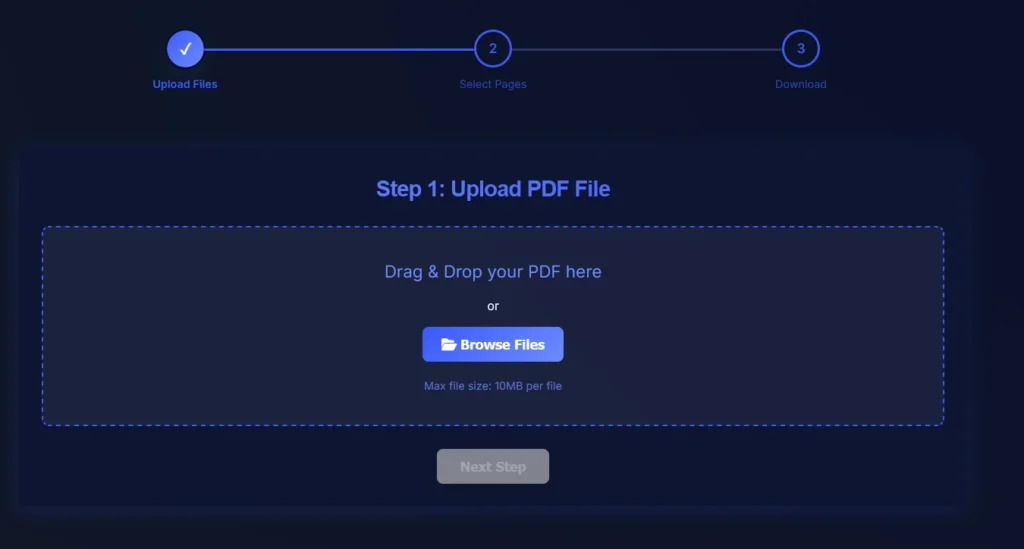
Steps:
- Upload your PDF file
- Select the pages you want to delete
- Apply the changes and download the updated PDF
Only the selected pages are removed. The rest of your document remains unchanged.
Delete PDF Pages – Quick Overview
Tool type: Online PDF page removal tool
Cost: Free
Installation: Not required
Watermark: No
Device support: All devices
Security: Secure file processing
This makes it one of the easiest ways to delete PDF pages online.
Why Use an Online Tool to Delete PDF Pages?
Online PDF tools are designed for speed and simplicity, making them ideal for everyday document tasks.
No software installation
You can delete PDF pages directly in your browser without downloads or updates.
Works on any device
Compatible with Windows, macOS, Linux, tablets, and mobile phones.
Fast and efficient
Remove unwanted pages in seconds instead of editing page by page.
Beginner-friendly
The interface is simple and easy to use.
Secure file handling
Files are processed automatically and are not stored longer than necessary.
According to Wikipedia, the PDF format is designed to preserve document layout across different devices and platforms.
Is It Safe to Delete PDF Pages Online?
Security is a common concern when uploading documents.
Trusted platforms like NasajTools use secure HTTPS connections and automated processing systems. Files are not manually accessed and are handled securely.
For highly sensitive documents, always review the privacy policy before uploading.
Delete PDF Pages vs Split PDF – What’s the Difference?
These two features are often confused, but they serve different purposes.
Delete PDF pages:
- Removes selected pages permanently
- Keeps one final PDF file
- Best for cleaning documents
Split PDF:
- Separates pages into multiple files
- Keeps all pages
- Best for extracting content
If your goal is to clean a document, deleting pages is the correct choice.
Who Should Use a PDF Page Deletion Tool?
This tool is useful for:
- Students and teachers
- Office workers and administrators
- Freelancers and consultants
- Business owners
- Legal and academic professionals
If you regularly work with documents, deleting unnecessary pages saves time and avoids mistakes.
Best Practices for Deleting Pages From a PDF
To get the best results:
- Double-check page numbers before deleting
- Keep a backup of the original PDF if needed
- Review the final PDF before sharing
- Remove blank pages first to reduce file size
Following these tips ensures clean and accurate documents.
Related PDF Tools You May Need
For complete PDF editing, you may also find these tools useful:
These internal links improve user experience and are important for SEO.
Final Thoughts
Unnecessary pages make PDF documents confusing and unprofessional. Instead of using complex PDF editors, you can delete PDF pages online for free in just a few clicks.
Use the Delete PDF Pages tool on NasajTools to remove unwanted pages quickly, securely, and without watermarks.